Plan the complete truck movement
Add loading, unloading and intermediate points together with the truck base when empty positioning should be included.

Estimate a road freight price for a European truck movement using the actual route, loaded and empty kilometres, country rates, fleet settings, tolls, driver time and commercial margin. Build the transport before you quote it.
A useful road freight calculation starts with the movement the truck will actually perform. Loaded distance alone can hide deadhead, country-cost differences and route-specific charges.
Add loading, unloading and intermediate points together with the truck base when empty positioning should be included.
Apply country rates, fleet assumptions, tolls, driver time and route-specific expenses to the complete planned movement.
Keep the internal cost visible, apply your commercial uplift and use the result as the basis for a customer quotation.
Customer freight price = complete internal route cost + commercial uplift
The same origin and destination can produce different selling prices depending on the truck movement, route countries, cargo requirements and cost model.
Use the complete truck movement instead of pricing only the customer-loaded leg.
Apply different kilometre rates to country segments when operating costs vary across the European route.
Keep the quotation connected to the fleet profile selected for the transport calculation.
Include estimated road charges and add known ferry, tunnel or route-specific expenses separately.
Use the complete distance to estimate driving time, breaks, daily rests and time-related operating cost.
Apply a clear commercial uplift after the internal route cost has been calculated.
Assume the truck runs 90 km empty to collection and 720 km loaded to delivery. Route cost, tolls and time-related expenses are calculated before a 12 percent commercial uplift is applied.
The example demonstrates the difference between what the movement costs internally and what is quoted to the customer.
| Freight pricing component | Example amount |
|---|---|
| Loaded and empty distance cost | €905.00 |
| Estimated tolls | €135.00 |
| Time and fixed expenses | €110.00 |
| Internal route cost | €1,150.00 |
| Commercial uplift (12%) | €138.00 |
| Estimated road freight price | €1,288.00 |
Illustrative example only. It is not a binding carrier quotation or a market-rate guarantee.
Include the vehicle movement required to reach the load instead of silently absorbing empty kilometres.
Use actual route countries and your own operating assumptions instead of one generic kilometre price.
See whether the proposed selling price remains above the internal route cost before sending it to the customer.
Retain a clear breakdown of the route assumptions behind the final road freight price.
A road freight price can be built from the complete truck movement, country-specific distance cost, tolls, driver and time cost, fixed expenses and a commercial uplift.
Yes. A truck base can be added so empty positioning to the first loading point remains visible in the transport calculation.
No. LogicCalc calculates a planning price from your route and configured cost assumptions; it does not claim to provide a guaranteed live carrier market rate.
Yes. Estimated tolls can remain visible separately and can be included in the final customer price when that matches your pricing model.
This is a real LogicCalc workspace view. Use your own route, cargo, fleet and commercial settings for the actual calculation.
Open LogicCalc →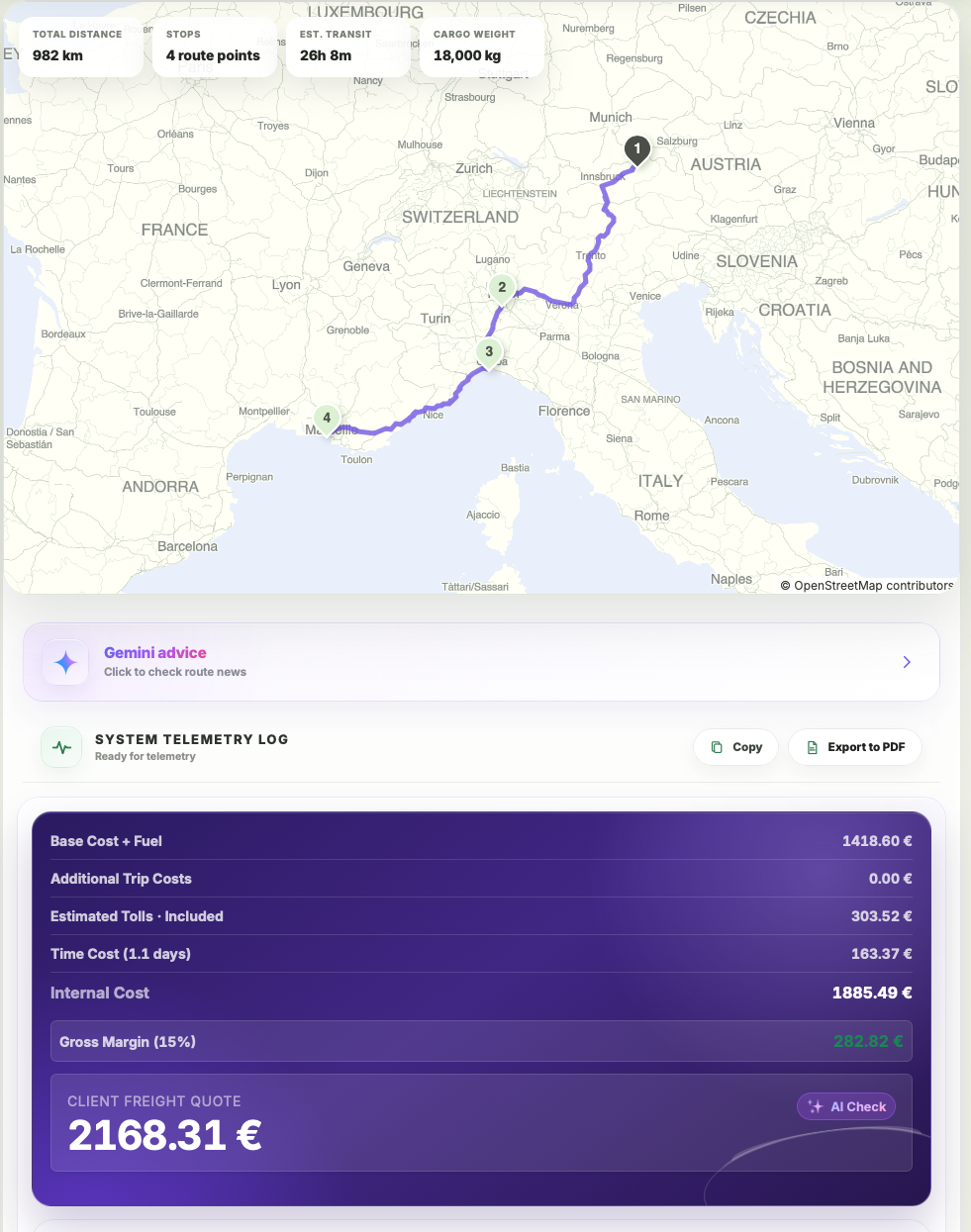
Explore route planning, transport pricing, cargo, driver-time and sustainability tools in one connected workspace.
Build the complete truck movement, review internal route cost and apply the commercial margin only after the operating assumptions are visible.
Road freight results are planning estimates. Verify route restrictions, toll tariffs, vehicle suitability, carrier availability, legal requirements and current commercial conditions before confirming a transport order.