Calculate internal cost
Complete the route, country rates, tolls, driver time and fixed expenses before applying any commercial uplift.

Turn the internal cost of a transport route into a customer price and understand the difference between markup and margin. Keep route cost, commercial uplift and selling price visible as separate values.
A profitable quotation starts with a complete internal route cost. The commercial uplift is then added to cost, while the resulting gross margin is measured against the final selling price.
Complete the route, country rates, tolls, driver time and fixed expenses before applying any commercial uplift.
Apply a percentage uplift or enter the intended selling price, depending on the company quotation process.
Compare profit amount, markup and margin so the price is not accepted with a misunderstood percentage.
Profit = selling price − cost; markup = profit ÷ cost × 100; margin = profit ÷ selling price × 100
The percentage is only meaningful when the underlying route cost is complete and the company knows whether it is using markup on cost or margin on revenue.
Use distance, fuel, tolls, driver time and route-specific expenses to establish the cost base.
Add the percentage or amount applied on top of internal cost when creating the quotation.
Review the final amount offered to the customer after all included costs and uplift are applied.
See the monetary difference between the selling price and the internal transport cost.
Measure profit as a percentage of the internal cost base.
Measure profit as a percentage of the final customer price.
Assume the completed internal route cost is €1,000. Applying a 15% markup on cost adds €150 and produces a customer price of €1,150.
The gross margin is not 15%. Because margin is measured against the selling price, the same quotation produces a margin of approximately 13.04%.
| Pricing value | Example result |
|---|---|
| Internal transport cost | €1,000.00 |
| Markup on cost | 15.00% |
| Gross profit amount | €150.00 |
| Customer price | €1,150.00 |
| Gross margin on price | 13.04% |
This is a simplified gross calculation before taxes, commissions, claims, financing costs and other company overheads.
A 15% markup does not produce a 15% margin, so both figures should be visible when approving the price.
Apply margin only after tolls, empty kilometres, driver time and other included expenses are accounted for.
Review routes using the same pricing method instead of mixing manual calculations and different percentage definitions.
Show internal cost, profit amount and customer price as separate values before sending the quotation.
Markup measures profit against cost, while margin measures profit against selling price. The percentages are therefore different for the same quotation.
Multiply the internal cost by one plus the markup percentage. For example, €1,000 with a 15% markup becomes €1,150.
Divide cost by one minus the target margin expressed as a decimal. A 15% target margin on €1,000 requires a selling price of about €1,176.47.
Include every expense that the company intends to recover through the quoted price. Otherwise the apparent margin can be higher than the real result.
This is a real LogicCalc workspace view. Use your own route, cargo, fleet and commercial settings for the actual calculation.
Open LogicCalc →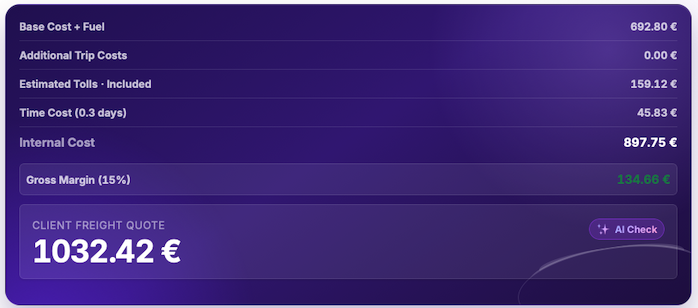
Explore route planning, transport pricing, cargo, driver-time and sustainability tools in one connected workspace.
Complete the transport cost in LogicCalc, apply the commercial uplift and review profit, markup and margin before confirming the customer price.
Margin results are commercial planning figures, not accounting or tax advice. Final profitability can change because of overheads, claims, delays, currency, financing and costs outside the route calculation.