Build the internal trip cost
Start with the calculated route and its internal cost components. Keep distance-based cost, tolls and any fixed trip charges on the cost side before you think about the sell price.

Turn the economics of one calculated trip into a customer price without losing sight of the internal cost. Route cost, tolls and fixed trip charges stay visible before a target margin is applied.
Start with the calculated route and its internal cost components. Keep distance-based cost, tolls and any fixed trip charges on the cost side before you think about the sell price.
Apply the intended surcharge or target margin to the trip economics rather than guessing a round figure. The quote should make the gap between cost and client price explicit.
Check the proposed customer price against the underlying trip cost. A quote that looks attractive in isolation can still be weak if tolls, fixed charges or route changes have moved the cost base.
Use the quote calculator when the route is already known and the decision is commercial: what should this specific transport be offered for?
Prepare a spot price from the actual route calculation instead of starting from a generic €/km guess.
Check whether the intended customer price still leaves enough room above the current internal trip cost.
Keep the price calculation attached to the route so it can later be copied into a quotation or report without rebuilding the economics in a spreadsheet.
Start from route costs, add tolls and other fixed charges, then apply the desired margin. LogicCalc keeps internal economics and the client price in the same route calculation.
No. Internal cost is the estimated cost of performing the trip; the client price is the commercial amount offered after the relevant additions and margin logic.
Use the cost items that actually belong to the trip: route-based operating cost, tolls and any relevant fixed or manual charges. Missing a material cost makes the margin look better than it really is.
Cost per kilometre builds an internal unit-cost baseline for the truck. The quote calculator applies trip-specific distance, tolls and charges to a real route and turns that trip economics into a customer price.
No. It is a planning result based on the inputs and settings available at calculation time. Unexpected waiting, rerouting, extra services or incorrect cost assumptions can change the final result.
Before sending a price, verify that the route and all material cost inputs still match the job you are actually quoting.
This is a real LogicCalc workspace view. Use your own route, cargo, fleet and commercial settings for the actual calculation.
Open LogicCalc →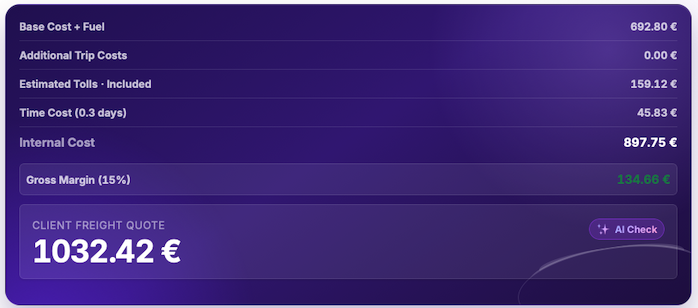
LogicCalc is a planning tool. Always verify operational, legal and contractual requirements for the actual transport.