Convert fuel consumption to €/km
Translate litres per 100 km and the diesel price into a fuel cost per kilometre. For example, 32 L/100 km at €1.50/L equals €0.48/km before any other cost is added.

Reduce the truck cost model to one internal €/km baseline while keeping the components visible. Fuel, other kilometre-driven costs and the kilometre share of annual fixed expenses should not be mixed into an unexplained single number.
Translate litres per 100 km and the diesel price into a fuel cost per kilometre. For example, 32 L/100 km at €1.50/L equals €0.48/km before any other cost is added.
Add AdBlue, maintenance, tyres and other kilometre-driven expenses so fuel is not mistaken for the full running cost.
Spread annual driver and vehicle fixed costs across realistic annual mileage, then combine them with variable cost to obtain the internal cost per total kilometre.
Use cost per kilometre as an internal unit-cost baseline for route economics, benchmarking and rate decisions — not as an automatic customer price.
Check whether a negotiated €/km rate is above the truck’s current internal cost base before considering empty running and route-specific extras.
Compare fleet profiles using the same annual mileage and cost assumptions so the €/km difference has operational meaning.
Track how fuel price, consumption, maintenance or utilisation changes move the cost per kilometre over time.
With 32 L/100 km at €1.50/L, fuel alone costs €0.48/km. LogicCalc then adds AdBlue, maintenance, tyres and the per-kilometre share of annual fixed costs to show the real operating cost.
No. Fuel is only one variable component. The real truck cost per kilometre can also include AdBlue, maintenance, tyres, driver cost, lease, insurance, tax, depreciation and other fixed expenses.
Yes if the purpose is to estimate the full internal operating cost. Fixed annual costs need to be allocated across realistic annual kilometres so every kilometre carries its share of the vehicle and driver cost base.
The internal cost-per-total-kilometre baseline should reflect every kilometre the truck actually runs. To convert that into the minimum revenue needed per loaded kilometre, use the break-even rate calculation with the empty-mileage share.
Usually not. It is an internal cost baseline. A sell rate may also need empty-mileage recovery, tolls, trip-specific charges, margin and the commercial conditions of the job.
A neat €/km number can be misleading if the annual mileage or cost components behind it are incomplete.
This is a real LogicCalc workspace view. Use your own route, cargo, fleet and commercial settings for the actual calculation.
Open LogicCalc →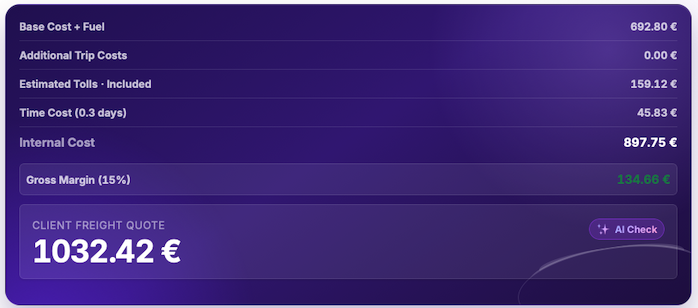
LogicCalc is a planning tool. Always verify operational, legal and contractual requirements for the actual transport.