Start from route distance
Use the road distance of the calculated trip rather than straight-line distance. Fuel demand scales with the kilometres the truck is expected to drive.

Estimate how much fuel a truck is likely to use on a calculated route from route distance, the active truck consumption profile and payload. The result is a planning estimate in litres, not a measurement from the vehicle.
Use the road distance of the calculated trip rather than straight-line distance. Fuel demand scales with the kilometres the truck is expected to drive.
Apply the reference fuel-consumption setting of the active truck profile together with the current payload information used by LogicCalc.
Use the resulting fuel quantity as a planning input for trip economics and CO₂, and update the profile when the truck or load changes.
Use this calculator when you need a route-level fuel estimate before the trip, not a post-trip fuel reconciliation.
Estimate litres required for a planned route so fuel can be included in the trip-cost model before dispatch.
Compare truck profiles or load assumptions on the same route to see how the estimate changes with the active setup.
Use the fuel estimate as one of the inputs behind the route-level CO₂ estimate instead of relying on distance alone.
A 600 km route with a reference consumption of 30 L/100 km starts from about 180 L before payload adjustments. LogicCalc can adjust the estimate according to the active truck profile and load.
The page uses calculated route distance together with the active truck fuel-consumption profile and payload information.
No. It is a planning estimate. Actual litres can differ because the executed trip and real conditions may differ from the calculation inputs.
The page is designed to adjust the estimate using the current load together with the truck profile, so the same route can produce a different estimate for a different payload.
Fuel consumption estimates litres used on a trip. Cost per kilometre combines fuel with other variable and fixed operating costs to produce an internal €/km baseline.
Keep the route, truck profile and payload aligned with the actual job; otherwise a precise-looking litre result can still be based on the wrong assumptions.
This is a real LogicCalc workspace view. Use your own route, cargo, fleet and commercial settings for the actual calculation.
Open LogicCalc →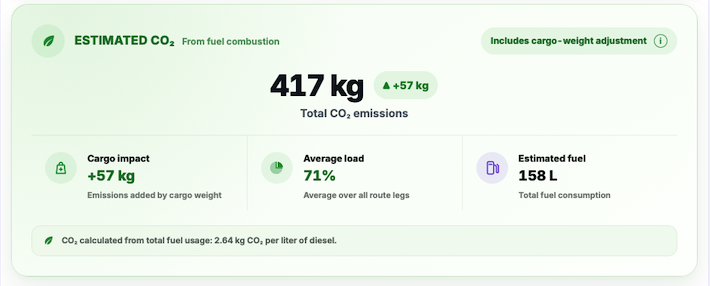
LogicCalc is a planning tool. Always verify operational, legal and contractual requirements for the actual transport.