Calculate the complete route
Include the truck base, loaded legs, unloading points and deadhead movement so all kilometres that consume resources are counted.

Calculate what a European truck trip costs internally before adding margin. Combine loaded and empty distance, country kilometre rates, fuel, tolls, driver time, ferries and other fixed expenses to estimate break-even freight cost.
Freight cost is the economic cost of performing the transport. Keeping it separate from the selling price makes break-even and profit easier to understand.
Include the truck base, loaded legs, unloading points and deadhead movement so all kilometres that consume resources are counted.
Apply country rates, fuel, toll estimates, driver and time cost plus ferries or other route-specific expenses.
Use the internal total and cost per kilometre to understand the minimum economics before commercial uplift is applied.
Internal freight cost = distance cost + fuel + tolls + driver and time cost + route-specific fixed expenses
A transparent calculation keeps each cost driver visible so the dispatcher can see why a route became more or less expensive.
Apply your own kilometre rates to loaded and empty route segments, including country-specific assumptions.
Include the fuel surcharge or operating assumptions used by the selected fleet profile.
Add estimated truck road charges by route country and replace the estimate when a better figure is available.
Account for the economic impact of driving time, pauses, daily rests and elapsed transport time when used by your cost model.
Add ferries, tunnel reservations, handling, parking or other known costs not already contained in the kilometre rate.
Divide the complete internal cost by the complete planned distance to compare route economics on a common basis.
Assume the complete truck movement is 800 km including 75 km of empty positioning. Distance cost, tolls, time cost and route-specific expenses are added to determine the internal freight cost.
Commercial margin is intentionally excluded from the internal total so break-even remains visible.
| Internal cost component | Example amount |
|---|---|
| Distance and fuel cost | €820.00 |
| Estimated tolls | €140.00 |
| Driver and time cost | €95.00 |
| Fixed route expenses | €45.00 |
| Internal freight cost | €1,100.00 |
| Break-even cost per kilometre | €1.38/km |
Illustrative example only. Use your own operating rates, vehicle assumptions and confirmed route charges.
Know the internal route cost before margin changes the number presented to the customer.
Include empty positioning and all operational legs instead of evaluating only loaded kilometres.
Turn total trip economics into a comparable break-even cost per kilometre.
Apply markup only after the internal cost is known, reducing the risk of quoting below the intended margin.
Freight cost is the internal economic cost of performing a transport movement, including the route and operating expenses required to complete it.
No. Freight cost describes the internal expense. Freight price is the selling amount charged to the customer after commercial margin or uplift is applied.
Yes for a complete operating-cost view. Empty kilometres still consume truck capacity, fuel, driver time and other resources.
Yes. LogicCalc can relate complete trip economics to the complete planned route distance so internal cost per kilometre can be reviewed.
This is a real LogicCalc workspace view. Use your own route, cargo, fleet and commercial settings for the actual calculation.
Open LogicCalc →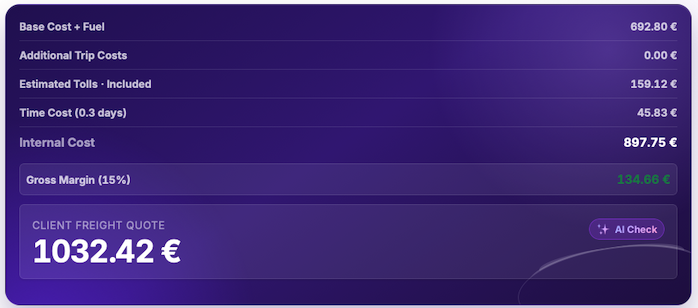
Explore route planning, transport pricing, cargo, driver-time and sustainability tools in one connected workspace.
Calculate the complete route economics first, then use the internal result as the foundation for freight pricing and profitability decisions.
Freight cost results are planning estimates based on configured and entered values. Verify actual fuel, toll, wage, ferry, maintenance, vehicle and contractual costs used by your business.