Calculate the base route
Build the full route, including optional empty positioning, and calculate each country segment using the configured kilometre rates.

Calculate a percentage-based fuel surcharge on top of the distance-based route cost. Keep the base calculation, fuel adjustment, additional trip expenses and commercial margin visible in one freight-pricing workspace.
LogicCalc applies the configured fuel surcharge percentage to the base distance-based route calculation. The fuel amount remains separate so you can see exactly how it changes the transport total.
Build the full route, including optional empty positioning, and calculate each country segment using the configured kilometre rates.
Set the percentage used by your company or contract. LogicCalc calculates the fuel adjustment from the base route cost.
Add tolls, time cost and fixed expenses, then review internal cost, margin and the final client freight quote.
Fuel surcharge amount = base route cost × fuel surcharge percentage ÷ 100
The percentage is only one part of the result. The route, kilometre rates and whether empty positioning is included determine the base amount to which the fuel surcharge is applied.
The distance-based cost is calculated before the fuel adjustment is added.
Use the current percentage agreed with the customer, carrier or internal pricing policy.
Longer routes and additional stops increase the distance-based amount used as the surcharge base.
A positioning run from the truck base to the first loading point can be included in the base calculation.
Tolls, ferries, driver time and fixed expenses are shown separately from the percentage-based fuel surcharge.
After internal route costs are assembled, a commercial margin can be applied to calculate the client price.
Assume the distance-based route cost is €1,100.00 and the configured fuel surcharge is 12.5%. The surcharge amount is calculated directly from the base route cost.
Tolls and other route expenses are then added to the fuel-adjusted total. In this simplified example, a 15% commercial margin is applied to the internal cost.
| Calculation component | Example amount |
|---|---|
| Base route cost | €1,100.00 |
| Fuel surcharge (12.5%) | €137.50 |
| Base cost plus fuel surcharge | €1,237.50 |
| Tolls and fixed expenses | €180.00 |
| Internal transport cost | €1,417.50 |
| Commercial margin (15%) | €212.63 |
| Estimated client price | €1,630.13 |
Illustrative example only. Use the percentage and commercial rules that apply to the actual transport order.
Show the original route calculation separately from the fuel-related adjustment.
Change one percentage without rebuilding the complete country-rate calculation.
Keep fuel, tolls, fixed expenses and margin visible as different parts of the price.
The fuel surcharge stays connected to distance, empty positioning, tolls, transit time and PDF export.
A fuel surcharge is an additional amount intended to reflect fuel-price pressure. In LogicCalc it is entered as a percentage and calculated from the base distance-based route cost.
LogicCalc multiplies the base route cost by the entered fuel surcharge percentage and divides the result by 100.
In the current LogicCalc calculation, the percentage-based fuel surcharge is calculated from the base route cost. Tolls, time-related costs and fixed expenses are added separately.
Yes, when a deadhead route is calculated from the truck base to the first loading point, its distance-based cost becomes part of the base route calculation.
Use the percentage agreed in the transport contract or required by your company pricing policy. LogicCalc does not determine an official market percentage.
Yes. The calculation can be combined with other costs and commercial margin and included in a client-ready route summary.
This is a real LogicCalc workspace view. Use your own route, cargo, fleet and commercial settings for the actual calculation.
Open LogicCalc →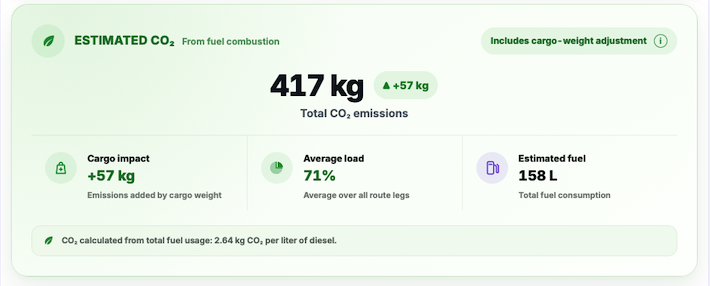
Explore route planning, transport pricing, cargo, driver-time and sustainability tools in one connected workspace.
Open LogicCalc, calculate the complete route and apply your current fuel surcharge percentage without hiding the base cost.
Fuel surcharge methods vary between companies and contracts. LogicCalc provides a configurable planning calculation and does not determine an official or legally required surcharge percentage.