Enter the truck base
Add the vehicle starting location in Fleet Profile settings. This becomes the origin of the optional empty positioning route.

Calculate the empty positioning run from the truck base to the first loading point. Include deadhead kilometres in total distance, country-rate cost, fuel use, transit planning and the final freight price instead of treating them as free kilometres.
LogicCalc creates a separate positioning leg between the configured truck base and the first route point. That leg is shown as empty deadhead and is included in route distance and distance-based cost.
Add the vehicle starting location in Fleet Profile settings. This becomes the origin of the optional empty positioning route.
Add the first loading point and the remaining loading, unloading or intermediate stops.
LogicCalc adds deadhead distance to the loaded route and includes its country-rate cost, fuel use and effect on the final price.
Total planned distance = empty positioning distance + sum of all loaded and intermediate route legs
The financial effect of deadhead depends on the distance from the base, the countries crossed, configured kilometre rates and how the positioning run affects fuel and transit time.
The saved base location determines where the empty positioning route begins.
The first active route point becomes the destination of the empty leg.
LogicCalc calculates a real road leg instead of using straight-line distance.
Each country segment of the empty route can use its own configured euro-per-kilometre rate.
Fuel reporting can distinguish the positioning run and apply the empty-vehicle consumption factor.
Deadhead cost becomes part of internal route economics before margin and client price are calculated.
Assume the truck is based 145 km from the first loading point. The loaded route after pickup is 690 km, giving a complete planned distance of 835 km.
In this simplified example, the empty and loaded legs use different average kilometre rates. A 10% fuel surcharge is then calculated from the combined distance-based route cost.
| Route component | Example result |
|---|---|
| Empty positioning distance | 145 km |
| Loaded route distance | 690 km |
| Total planned distance | 835 km |
| Empty positioning cost | €181.25 |
| Loaded route cost | €931.50 |
| Fuel surcharge (10%) | €111.28 |
| Base route cost plus fuel | €1,224.03 |
Illustrative example only. Actual results depend on the road route, country split, configured rates, fuel settings and vehicle profile.
Recover the cost of moving the truck to the first loading point.
Keep the positioning leg visible beside every loaded route segment.
Compare the client price with internal cost after deadhead has been included.
Empty kilometres affect consumption, driver time, vehicle use and total trip duration.
Empty mileage, deadhead or positioning distance is the distance a truck travels without the transport cargo, for example from its base to the first loading point.
When a truck starting base is entered, LogicCalc builds a separate road route from that base to the first route point and stores it as the positioning leg.
Yes. The positioning distance is added to the sum of the remaining route legs for route KPIs, transit planning and cost calculation.
Yes. The deadhead route has its own country breakdown, and the configured rate for each country can be used to calculate its cost.
Because the deadhead distance-based cost is included in the base route calculation, it also affects a percentage-based fuel surcharge.
That is a commercial decision. LogicCalc shows the cost so the dispatcher can decide how much of it must be recovered in the quoted price.
This is a real LogicCalc workspace view. Use your own route, cargo, fleet and commercial settings for the actual calculation.
Open LogicCalc →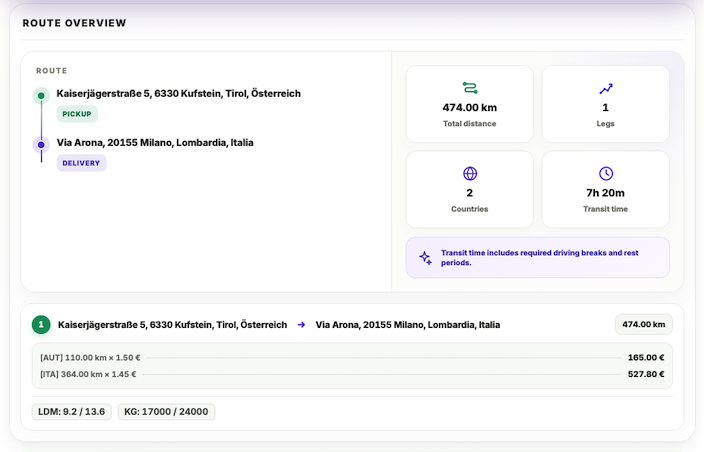
Explore route planning, transport pricing, cargo, driver-time and sustainability tools in one connected workspace.
Set the truck base, add the first loading point and let LogicCalc include the empty positioning run in the full route calculation.
Empty mileage results are planning estimates based on routing data and configured rates. Verify route access, real vehicle position, operational timing and commercial agreement before dispatch.