Calculate the truck route
Add all route points so LogicCalc can identify the route countries and the distance driven in each one.

Estimate truck and HGV toll costs for a European road route. LogicCalc classifies route segments, applies supported country and special-facility toll rules for the selected vehicle, and shows tollable versus Not classified distance before the estimate enters route economics.
European HGV tolls vary by country, road network, vehicle class and current tariff rules. LogicCalc evaluates the calculated route against supported toll networks and tariff logic. Segments that cannot be classified confidently remain Not classified instead of being silently treated as free.
Add all route points so LogicCalc can identify the route countries and the distance driven in each one.
LogicCalc checks route geometry and available road metadata against supported toll networks so chargeable sections can be separated from known-free and Not classified distance.
Use the selected fleet profile and supported tariff rules to estimate the charge. Review country and facility details, then override the final amount when an authoritative route-specific value is available.
Estimated truck toll = matched tollable sections and fixed facilities evaluated with supported vehicle and tariff rules; uncertain distance remains Not classified
Real truck toll charges can depend on far more than distance, so the estimate should remain transparent and easy to replace with an official route-specific amount.
The corridor determines which national charging systems and special road sections can affect the trip.
Vehicle category, mass, axles and emissions class can influence real toll tariffs depending on the country.
LogicCalc classifies route sections against supported national toll networks instead of applying one generic Europe-wide rate to every kilometre.
Supported bridges, tunnels and fixed-charge facilities can be handled separately from kilometre-based toll roads; anything uncertain remains visible for review.
Review tollable and Not classified distance together with country or facility charges before using the estimate in route economics or a customer quote.
Keep estimated tolls visible separately and decide whether they are added to the final freight price.
Assume a truck route crosses Austria, Germany and France. LogicCalc first classifies supported tollable road sections, then evaluates the matched segments with the applicable vehicle and tariff logic available to the estimator.
Special facilities can appear separately from kilometre-based toll roads. Any uncertain part of the route remains Not classified, and the final estimate can still be replaced when an official toll portal or onboard unit provides a better figure.
| Truck toll component | Example estimate |
|---|---|
| Austria route segment | €84.00 |
| Germany route segment | €62.00 |
| France route segment | €96.00 |
| Special road charge | €38.00 |
| Estimated total truck toll | €280.00 |
Illustrative estimate only. Official toll portals, onboard units and current route-specific tariff data remain the authoritative source.
HGV tolls can materially change the economics of a cross-border movement and should remain visible in the calculation.
A country breakdown is easier to review than one unexplained European toll amount.
Use a manual override when an official portal, onboard unit or carrier-specific source provides a more precise route amount.
Keep tolls separate for internal review and decide whether they are absorbed or added to the customer price.
No. LogicCalc provides a planning estimate from supported route-network classification, vehicle data and tariff logic. Official toll operators, onboard units and booking systems remain authoritative for the final charge.
Vehicle mass, axle count, emissions class, category and national charging rules can change the applicable tariff.
Yes. The final toll value can be overridden when you have a better route-specific figure from an authoritative source.
Yes. The toll estimate can remain visible for internal planning while a separate setting controls whether it enters the final customer price.
This is a real LogicCalc workspace view. Use your own route, cargo, fleet and commercial settings for the actual calculation.
Open LogicCalc →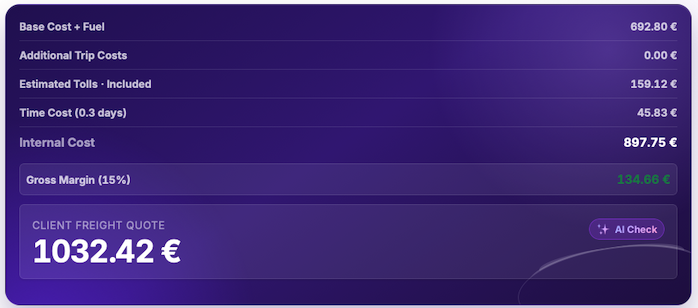
Explore route planning, transport pricing, cargo, driver-time and sustainability tools in one connected workspace.
Calculate the route, review the country toll breakdown and replace the planning estimate whenever a confirmed route-specific amount is available.
Truck toll results are planning estimates, not official tariff quotations. Verify current rates, chargeable road sections, vehicle category, mass, emission class, axles and required onboard equipment with authoritative toll sources.