Build the transport route
Add the truck base, loading points, unloading points and intermediate stops. LogicCalc calculates the road distance and country segments.

Plan a European road-freight movement in one logistics calculator. Build the truck route, review distance by country, calculate loading metres, estimate tolls and driver time, model operating cost and turn the result into a customer price.
LogicCalc connects route, cargo, time and economics instead of forcing the dispatcher to maintain separate calculations for the same transport order.
Add the truck base, loading points, unloading points and intermediate stops. LogicCalc calculates the road distance and country segments.
Enter cargo dimensions and weight, choose the fleet profile and apply country rates, fuel, toll and time assumptions.
Compare route distance, LDM, driver time, internal transport cost, toll estimate, commercial margin and customer price in one workspace.
Route + cargo + time + tolls + operating cost + margin = one complete road-freight planning calculation
Use the same route data for the calculations dispatchers and transport managers commonly need before accepting, pricing or dispatching a load.
Plan multi-stop European routes, review country distance and include empty positioning from the truck base.
Combine kilometre cost, fuel, tolls, time-related cost and fixed route expenses to estimate internal trip cost.
Estimate road charges by route country and keep the final amount editable when better tariff information is available.
Calculate LDM from cargo dimensions, quantity and stackability to understand how much trailer floor length is required.
Estimate driving time together with required pauses and daily rest periods from the complete planned distance.
Keep internal cost separate from selling price and apply the commercial uplift used for the customer quotation.
Assume a truck travels 70 km empty to a loading point and then 680 km loaded through several European countries. The shipment uses 8.0 LDM and the route requires toll and driver-time planning.
LogicCalc keeps those inputs together so the dispatcher can review operational feasibility and pricing without rebuilding the trip in separate tools.
| Planning result | Example |
|---|---|
| Complete route distance | 750 km |
| Empty positioning | 70 km |
| Cargo space | 8.0 LDM |
| Estimated tolls | €145.00 |
| Internal trip cost | €1,020.00 |
| Estimated customer price | €1,173.00 |
Illustrative values only. The actual result depends on your route, cargo, fleet settings, rates and current operating conditions.
Distance and country segments can feed cost, toll, driver-time and emissions calculations without manual duplication.
Check whether the load fits the trailer while also reviewing route economics and customer pricing.
Configure country rates, fleet profiles and commercial settings instead of relying on one unexplained market average.
Export selected route and calculation results to a client-ready PDF when the planning result is ready to share.
A logistics calculator combines transport inputs such as route distance, cargo space, tolls, driver time, operating cost and selling price to support planning and quotation decisions.
Yes. LogicCalc can plan multi-stop road-freight routes, include a truck starting base and analyse distance by route country.
Yes. Internal operating cost remains separate from commercial uplift so the final customer price can be reviewed transparently.
Yes. Cargo dimensions, quantity and stackability can be used to calculate loading metres and compare floor-space demand with the selected trailer.
No. Routing and toll outputs are planning estimates. Vehicle restrictions, official tariffs and current road conditions must be verified before dispatch.
This is a real LogicCalc workspace view. Use your own route, cargo, fleet and commercial settings for the actual calculation.
Open LogicCalc →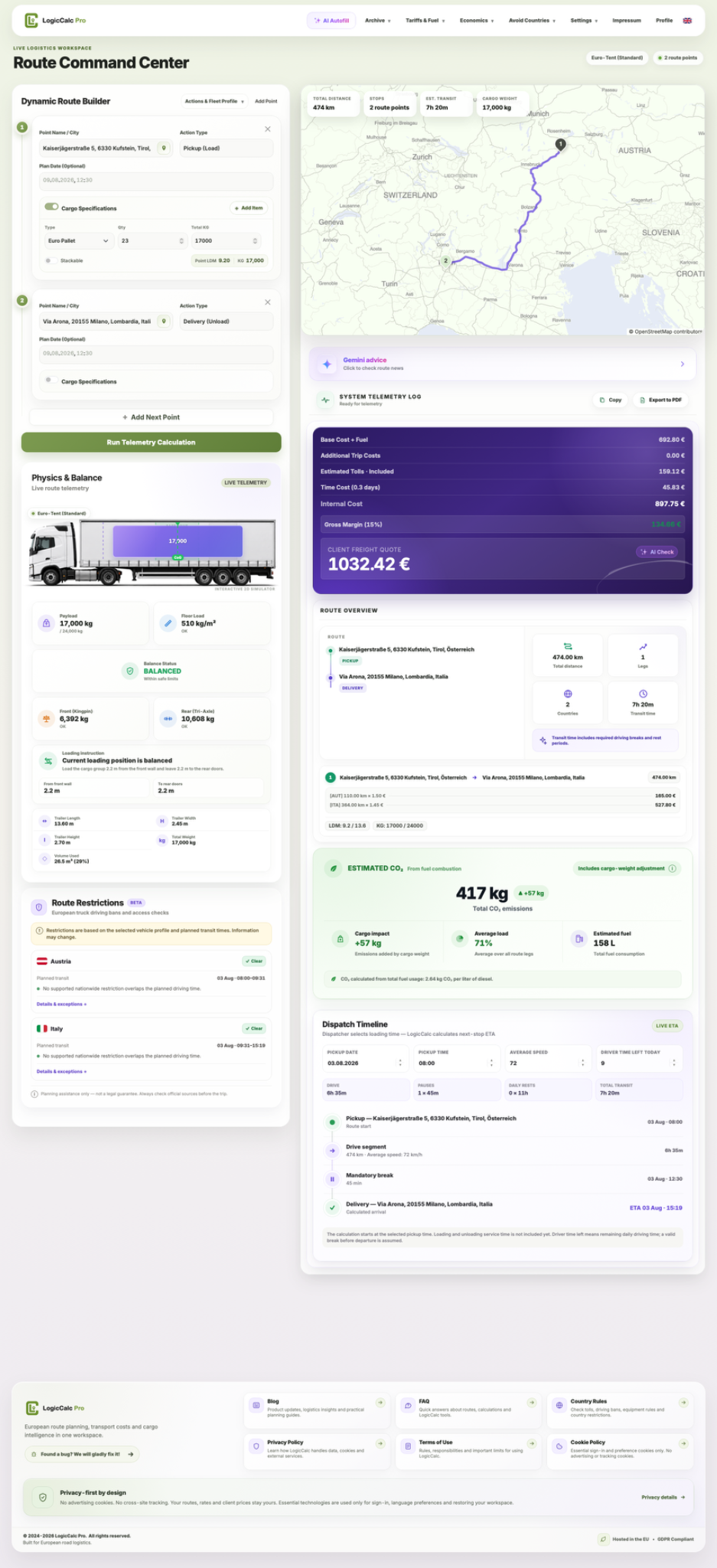
Explore route planning, transport pricing, cargo, driver-time and sustainability tools in one connected workspace.
Build the route, add cargo and fleet information, review time and cost, then turn the internal calculation into a clear customer price.
LogicCalc provides planning estimates only. Verify route restrictions, vehicle suitability, official toll tariffs, legal driving requirements, cargo securing and commercial conditions before dispatch.