Build the route
Add the loading, unloading and intermediate points, then calculate the route so LogicCalc can identify the countries and distance travelled in each one.

Check a planned European truck route against supported Sunday, weekend, public-holiday, night and seasonal HGV driving restrictions. LogicCalc combines the route countries, planned transit time and vehicle profile to flag restrictions before dispatch.
Instead of checking only the departure date, LogicCalc estimates when the truck is actually driving through each supported country and compares those driving windows with the encoded restriction rules.
Add the loading, unloading and intermediate points, then calculate the route so LogicCalc can identify the countries and distance travelled in each one.
The checker uses planned departure time, driving and rest timing, gross vehicle weight and trailer configuration to determine which rules can apply.
Each supported country is shown as clear, warning or restricted, with the relevant rule, time window, exceptions note and official source link.
Route countries + planned driving windows + vehicle profile = route-specific restriction check
The current checker focuses on deterministic country-level rules that can be evaluated from the route, vehicle profile and planned driving time. Route-specific restrictions are shown conservatively when exact road matching is not yet available.
Check supported national Sunday restrictions when the planned transit overlaps the restricted hours and vehicle category.
Compare planned driving windows with supported national public-holiday calendars and their applicable time periods.
Flag supported night-driving restrictions when a qualifying heavy vehicle is planned to move during the restricted window.
Identify selected summer or seasonal HGV restrictions where the rule is supported by the current LogicCalc data set.
Use gross vehicle weight instead of cargo payload so thresholds such as 7.5 t or 12 t are evaluated against the correct vehicle value.
Open the linked authority source for the country and verify exemptions, permits, temporary measures and route-specific conditions before dispatch.
The first release covers major European freight corridors across fourteen countries. Only countries that are actually present on the calculated route are shown in the Route Restrictions card.
Austria, Germany, Switzerland, Czechia, Slovakia, Hungary and Poland.
France, Belgium and the Netherlands.
Italy, Slovenia and Spain.
Denmark is included in the initial checker coverage.
European HGV restrictions can depend on the exact road, region, direction, cargo, permit, emissions class, transport purpose or temporary authority decision. LogicCalc therefore links to official sources and uses warnings when the route data is not detailed enough to prove that a restriction applies.
Use the LogicCalc warning to identify what needs attention, then confirm the current rule and any exemption with the official authority source for the actual transport.
Yes. For supported countries, LogicCalc compares the planned country transit time with encoded Sunday restrictions and the relevant vehicle-weight or trailer conditions.
Yes. Restriction thresholds are checked against gross vehicle weight, not cargo payload, because many European HGV bans are defined by the permitted vehicle mass or vehicle combination.
The current rule set includes supported 2026 holiday and annual restriction calendars for countries where those dates are required by the encoded national rules. Annual calendars need to be re-verified for future years.
Not yet as a deterministic route check. Local low-emission zones, street-level restrictions and exact regional road sections require additional geographic rule data and are planned as a later expansion.
No. The checker is designed to surface likely conflicts early in route planning. The dispatcher or carrier should still verify the current authority information, exemptions and permits before the vehicle departs.
This is a real LogicCalc workspace view. Use your own route, cargo, fleet and commercial settings for the actual calculation.
Open LogicCalc →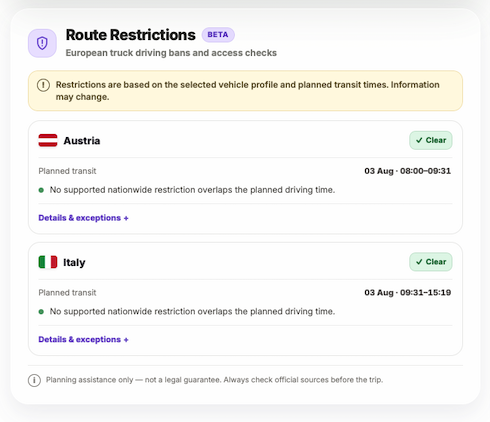
Explore route planning, transport pricing, cargo, driver-time and sustainability tools in one connected workspace.
Build the route in LogicCalc, set the planned departure and vehicle profile, then review the Route Restrictions card together with distance, driver time, tolls, cargo and transport economics.
LogicCalc provides planning assistance only. Truck restrictions can change and may include exemptions or route-specific conditions. Always verify the current official rules before dispatch.