Provide the freight order
Paste the order text or upload the available screenshot, image or PDF instead of retyping every field manually.

Turn an unstructured freight order into proposed route and cargo fields that are easier for a dispatcher to review. AI Autofill can read order text or an uploaded screenshot, image or PDF, but the extracted values still need human verification before calculation.
Paste the order text or upload the available screenshot, image or PDF instead of retyping every field manually.
AI Autofill proposes loading and unloading points, dates and cargo details such as pallets and weight from the supplied order content.
Check every proposed field against the original document, correct anything uncertain, and only then use the structured data in route and cargo calculations.
Use the parser to reduce repetitive order entry while keeping the dispatcher in control of what is accepted into the calculation.
Convert order emails or copied text into proposed structured fields so routine transport orders require less manual typing.
Extract useful route and cargo information from a transport-order PDF or image when the source is not already structured.
Give the dispatcher a reviewable draft of stops, dates, pallets, weight and cargo details before those values affect route, loading or cost calculations.
Paste an order email or upload a transport-order PDF. AI Autofill can propose loading and unloading stops, dates, pallets, weight and cargo details for you to verify before calculation.
The current page accepts freight-order text as well as a screenshot, image or PDF.
The existing workflow can propose loading and unloading points, dates, pallets, weight and other cargo details for review.
Review the extracted fields first. The parser produces proposed structured data, and the dispatcher should verify it against the original order before calculation.
No. It helps enter information into LogicCalc. The original order remains the source that should be checked when confirming addresses, dates, cargo and instructions.
AI extraction is an input aid, so the proposed data must be verified before it drives operational calculations.
This is a real LogicCalc workspace view. Use your own route, cargo, fleet and commercial settings for the actual calculation.
Open LogicCalc →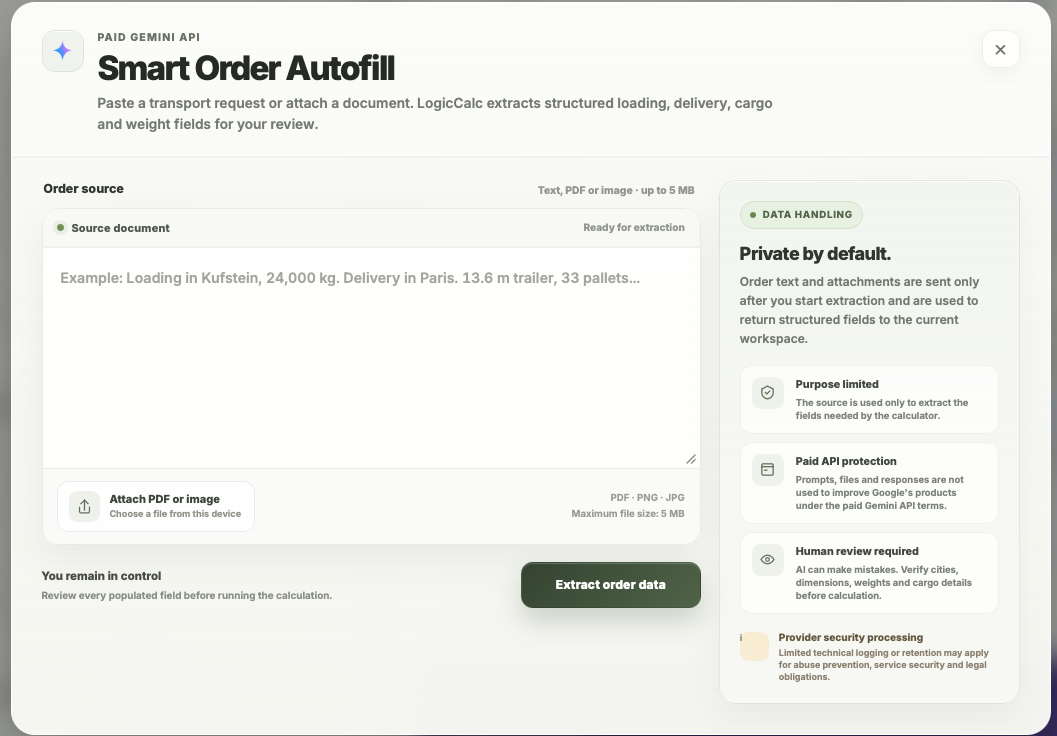
LogicCalc is a planning tool. Always verify operational, legal and contractual requirements for the actual transport.